Một số cảnh báo for fun
31-03-2025 Tags: services monitor
1. Cảnh báo usage network
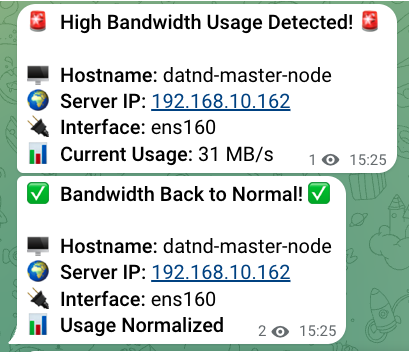
Đoạn script trên sẽ gửi cảnh báo nếu có lưu lượng truy cập mạng vượt quá 30MB/s. Có thể set thành service chạy ngầm. Về cơ chế hoạt động, script sẽ tính toán lưu lượng mạng nhận và truyền và tính tổng để tìm ra tổng lưu lượng mạng đang sử dụng.
#!/bin/bash

# Telegram Bot Credentials
BOT_TOKEN=""
CHAT_ID=""

# Network Interface (Change if needed)
INTERFACE="ens160"

# Bandwidth Threshold (in Megabytes per second)
THRESHOLD_MB=30

# Get Hostname and IP Address
HOSTNAME=$(hostname)
IP_ADDRESS=$(hostname -I | awk '{print $1}')  # Gets the first IP address

# Flag to track alert state
ALERT_TRIGGERED=false

# Function to send Telegram alert
send_alert() {
    MESSAGE="🚨 *High Bandwidth Usage Detected!* 🚨

🖥️ *Hostname:* $HOSTNAME
🌍 *Server IP:* $IP_ADDRESS
🔌 *Interface:* $INTERFACE
📊 *Current Usage:* $1 MB/s"

    curl -s -X POST "https://api.telegram.org/bot$BOT_TOKEN/sendMessage" \
        -d "chat_id=$CHAT_ID" \
        -d "text=$MESSAGE" \
        -d "parse_mode=Markdown"
}

# Function to send "Resolved" message
send_resolved() {
    MESSAGE="✅ *Bandwidth Back to Normal!* ✅

🖥️ *Hostname:* $HOSTNAME
🌍 *Server IP:* $IP_ADDRESS
🔌 *Interface:* $INTERFACE
📊 *Usage Normalized*"

    curl -s -X POST "https://api.telegram.org/bot$BOT_TOKEN/sendMessage" \
        -d "chat_id=$CHAT_ID" \
        -d "text=$MESSAGE" \
        -d "parse_mode=Markdown"
}

# Monitor bandwidth in a loop
while true; do
    # Get network usage (in bytes)
    RX_BEFORE=$(cat /sys/class/net/$INTERFACE/statistics/rx_bytes)
    TX_BEFORE=$(cat /sys/class/net/$INTERFACE/statistics/tx_bytes)

    # Wait for 1 second
    sleep 1

    RX_AFTER=$(cat /sys/class/net/$INTERFACE/statistics/rx_bytes)
    TX_AFTER=$(cat /sys/class/net/$INTERFACE/statistics/tx_bytes)

    # Calculate usage (convert bytes to Megabytes)
    RX_MB=$(( (RX_AFTER - RX_BEFORE) / 1024 / 1024 ))
    TX_MB=$(( (TX_AFTER - TX_BEFORE) / 1024 / 1024 ))
    TOTAL_MB=$((RX_MB + TX_MB))

    # Check if bandwidth exceeds threshold
    if [ "$TOTAL_MB" -gt "$THRESHOLD_MB" ]; then
        if [ "$ALERT_TRIGGERED" = false ]; then
            send_alert "$TOTAL_MB"
            ALERT_TRIGGERED=true
        fi
    else
        if [ "$ALERT_TRIGGERED" = true ]; then
            send_resolved
            ALERT_TRIGGERED=false
        fi
    fi

    # Run check every 5 seconds
    sleep 5
done
Ví dụ
2. Thông tin host
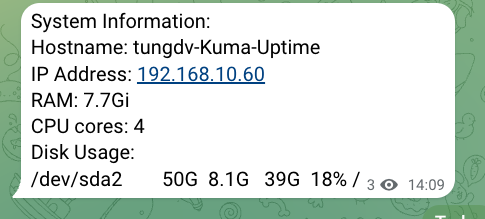
Cảnh báo này chỉ sử dụng để biết host name và tổng lưu lượng disk còn lại trên host nhằm hiểu rõ hơn về host. (Có thể add thêm một số thông tin nếu cần). Tuy vậy cảnh báo này có vẻ không cần thiết lắm for fun.
#!/bin/bash

# Gather system information
hostname_info=$(hostname)
ip_info=$(hostname -I | awk '{print $1}')
ram_info=$(free -h | grep Mem | awk '{print "RAM: " $2}')
cpu_cores=$(nproc)
cpu_info="CPU cores: $cpu_cores"
disk_info=$(df -h | grep '/dev/sda2')

# Format the message to be sent to Telegram
message="System Information:
Hostname: $hostname_info
IP Address: $ip_info
$ram_info
$cpu_info
Disk Usage:
$disk_info"

# Telegram bot API URL
token=""
chat_id=""

# Send the message to Telegram
curl -s -X POST https://api.telegram.org/bot$token/sendMessage \
    -d chat_id=$chat_id \
    -d text="$message"
Ví dụ:
3. Cảnh báo SSH Login
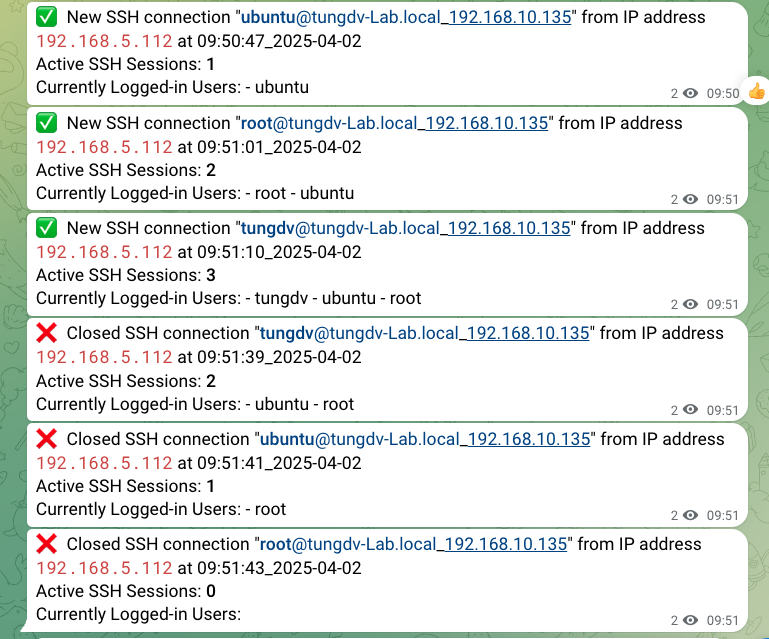
Khác với cảnh báo login SSH cơ bản, cảnh báo này đã được update thêm một số thông tin nhưu tổng số người đang SSH và username của những người đang SSH
#!/bin/bash
# Telegram Bot Token and Chat ID
TOKEN=""
ID=""

# Fetch system details
HOSTNAME=$(hostname -f)
HOST_IP=$(hostname -I | awk '{print $1}')  # Get host's primary IP address
DATE="$(date +"%H:%M:%S_%Y-%m-%d")"

# Get active SSH sessions count and list users
SSH_SESSIONS=$(who | grep -c "pts")
SSH_USERS=$(who | awk '{print "- " $1}' | uniq | paste -sd ' ' -)

if [ "$PAM_TYPE" = "open_session" ]; then
    SSH_SESSIONS=$((SSH_SESSIONS + 1))
    SSH_USERS="- $PAM_USER $SSH_USERS"
fi

# Build the message based on action type
if [ "$PAM_TYPE" = "open_session" ]; then
    MESSAGE="✅ New SSH connection \"<b>$PAM_USER</b>@${HOSTNAME}_${HOST_IP}\" from IP address <code>$PAM_RHOST</code> at $DATE
Active SSH Sessions: <b>$SSH_SESSIONS</b>
Currently Logged-in Users: $SSH_USERS"
elif [ "$PAM_TYPE" = "close_session" ]; then
    MESSAGE="❌ Closed SSH connection \"<b>$PAM_USER</b>@${HOSTNAME}_${HOST_IP}\" from IP address <code>$PAM_RHOST</code> at $DATE
Active SSH Sessions: <b>$SSH_SESSIONS</b>
Currently Logged-in Users: $SSH_USERS"
else
    MESSAGE="<b>$PAM_USER</b> did action: '<b>$PAM_TYPE</b>' at $DATE on <b>${HOSTNAME}_${HOST_IP}</b> from IP: <code>$PAM_RHOST</code> !
Active SSH Sessions: <b>$SSH_SESSIONS</b>

Currently Logged-in Users: $SSH_USERS"
fi

# Send the message to Telegram using the bot API
URL="https://api.telegram.org/bot$TOKEN/sendMessage"
curl -s -X POST $URL -d chat_id=$ID -d text="$MESSAGE" -d parse_mode='HTML' >/dev/null 2>&1
exit 0
Ví dụ:
Notes:
- Để set up cảnh báo cần enable PAM trong file /etc/ssh/ssd_config:
UsePAM yes - Add yêu cầu file ssh tại file /etc/pam.d/sshd
session required pam_exec.so /etc/security/telegram_login_alert.sh